
When people talk about enterprise AI transformation, it is easy to imagine AI being added on top of clean data, well-defined processes, and a neatly designed architecture.
That is rarely the environment I actually encounter.
In many companies, digital transformation itself is still incomplete. Systems have been built at different times by different teams and projects. Existing users already depend on them, and business rules are embedded in screens, automation, integrations, and operating habits.
AI projects usually do not start by replacing that environment. They enter a system that is already running.
That is why I think understanding the existing platform and the way people actually work inside it is just as important as understanding the AI itself. Otherwise, it is easy to rebuild something that already exists or expand the scope far beyond what the customer actually needs.
The Salesforce Email-to-Case case in this series looked simple at first.
There was no need to connect scattered internal data sources. There was no need to build RAG. There was no need to orchestrate ERP, CRM, and document repositories together.
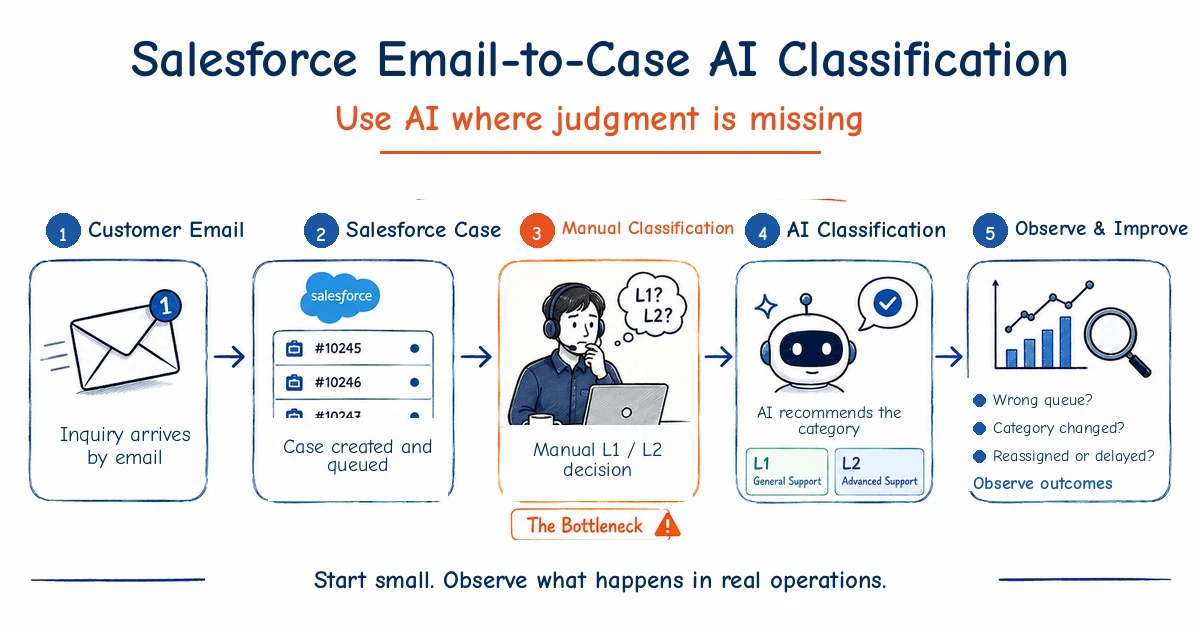
The requirement was simply to read a customer email and determine the Level 1 and Level 2 Category for the Salesforce Case.
That was all.
But once I started thinking about how the work actually happens after the model returns an answer, the design questions quickly moved beyond classification itself.
1. The Customer Asked for One Simple Classification Step
The customer was already using Salesforce Email-to-Case.
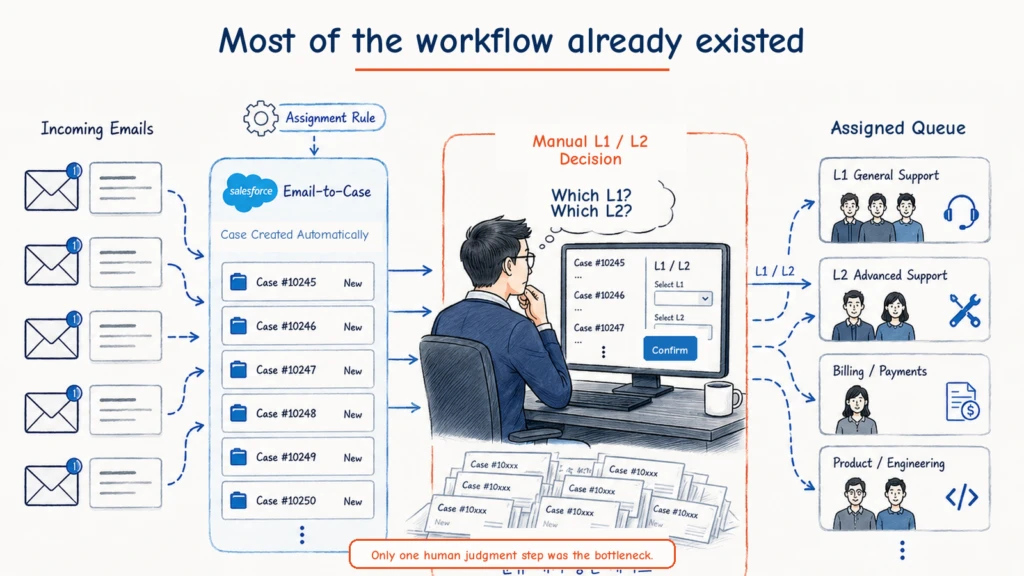
When a customer sent an email to the service address, Salesforce created the EmailMessage and Case and linked them. Once a Category was assigned, an existing Assignment Rule routed the Case to the appropriate team.
Most of the workflow was already there.
The missing step was the Category decision.
The organization managed inquiries with a Level 1 / Level 2 taxonomy, where each Level 2 belonged under a Level 1. For every new Case, someone had to read the email, select the correct Level 1, and then choose the appropriate Level 2 beneath it.
One manager was doing this manually.
The system itself was not down or blocked. But every new Case still had to pass through one person’s judgment before it could move to the right operating team. As volume increased, the speed of the whole process depended partly on how quickly that manager could read and categorize new emails.
The customer’s question was straightforward.
“Can AI classify just this part for us?”
My first reaction was also straightforward.
Yes.
And if I looked only at that requirement, there was no reason to make the solution complicated.
2. I Had to Understand Salesforce Before Designing the AI
A request like this can easily trigger the wrong sequence of questions.
Which model should we use? How should we write the prompt? Should this be an Agent? Do we need retrieval? Would RAG help?
In this case, those were not the first questions that mattered.
The first question was: what is Salesforce already doing for the customer?
Email-to-Case was already receiving the email, creating the Case and EmailMessage, and linking them together. After the Category was determined, the existing Assignment Rule already sent the Case to the appropriate team. Agents already had the screens and operating process they used to handle those Cases.
This was not a system that needed to be redesigned from the beginning.
Once I understood the existing flow, the part that AI actually needed to own became much smaller.
Read the initial email. Look at the valid taxonomy. Decide the appropriate Level 1 and Level 2.
That was the missing judgment.
Everything else could remain where it already worked.
This distinction matters in enterprise AI projects. If I had not understood the Salesforce side first, it would have been easy to move the email into another system, create new routing logic, build separate state management, and gradually turn a small classification requirement into a much larger platform project.
Enterprise AI rarely starts from nothing. There is already a CRM, an existing user interface, automation maintained by another team, integration logic, and years of operating behavior. Some parts may be modern and some may be old, but AI has to enter that environment rather than pretend it does not exist.
So the important question is not only what AI can build from scratch.
In many cases, it is more important to leave the parts that already work alone and find the exact point where human judgment is creating a bottleneck.
In this case, that point was clear.
Read the email and decide the Category.
That was where AI belonged.
3. This Did Not Need an Agent
Enterprise AI discussions now attach the word Agent to almost every problem.
This requirement did not need one.
It did not need long-term memory. It did not need complex retrieval. It did not need RAG.
When the first Case is created, retrieve the first EmailMessage.
Perform the required preprocessing.
Provide the valid Level 1 and Level 2 Categories to the model.
Have the model return the result in a defined format.
Validate that the returned values are allowed Categories, then write them to the Case.
After that, let the existing Assignment Rule continue.
The idea is not to hand the entire workflow to AI, but to let AI handle the specific moment where human judgment was missing inside an otherwise deterministic workflow.
That is close to the Agentic Moment I described in an earlier post.
In this case, that moment was very clear.
“Which Category does this email belong to?”
If we implement only that, the customer’s original requirement is already satisfied.
The cost can stay small, the existing Salesforce implementation barely changes, and users do not need to learn a new screen.
For a real project, that alone can be a very good first scope.
Deterministic Trigger
↓
Context Preparation
↓
Bounded AI Judgment
↓
Output Validation
↓
Existing Salesforce Automation
4. The Design Changed When I Thought About the People Doing the Work
The problem started to change when I stopped looking only at the system diagram and imagined the service agents actually doing the work.
The first question was simple.
What happens when the AI is wrong?
Suppose the AI classifies an email as Technical Support.
The existing Assignment Rule sends the Case to the Technical Support team. An agent picks it up and reads the email.
Then the agent may think: “This does not belong to our team.”
The agent changes the Category or transfers the Case to another team.
There is an important point here.
Up to that moment, the system may have reported no technical problem at all.
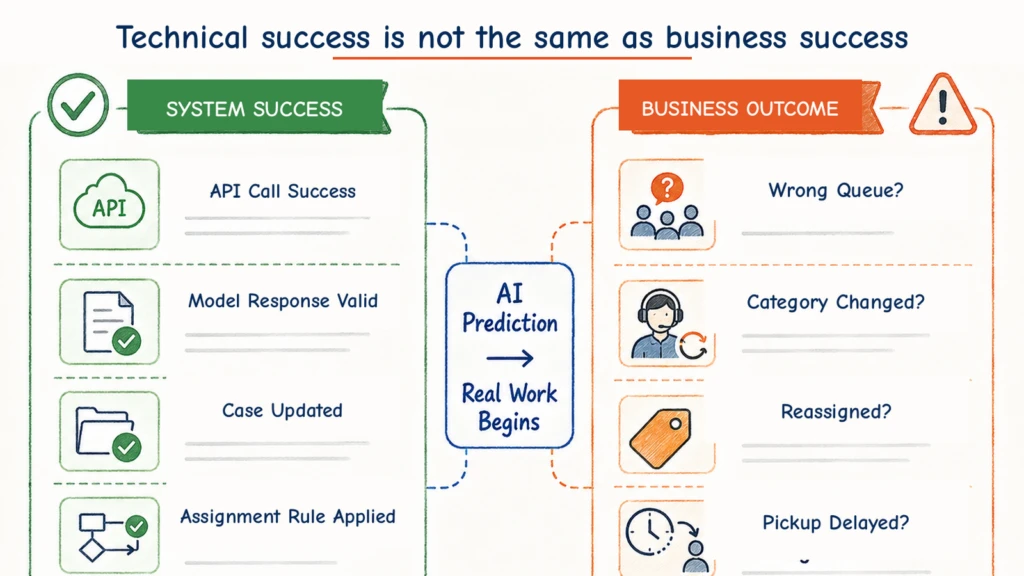
The LLM API call succeeded. The response format was valid. The Case Category was updated successfully. The Assignment Rule executed exactly as expected.
From a technical log, the transaction can look perfect.
But in the actual business process, the Case went to the wrong team.
That changed the question for me.
Instead of asking whether the API call succeeded, how do we know whether the AI judgment was actually right in the business process?
Once I asked that, the scope of a seemingly simple classification feature started to look different.
5. Email Is Much Messier Than a Classification Demo
The input itself is also less orderly than a classification demo suggests.
A customer may first send an email about a billing issue.
A few minutes later, they may send another message saying there is also a device problem.
Two minutes after that, they may write: “The device issue is resolved. Please just check the original billing issue.”
They may also start a completely different inquiry inside the same email thread.
“The previous issue is resolved, but now another product is not working.”
It is also entirely possible for several emails to arrive in a short burst before an agent has even picked up the first Case.
At that point, another idea that initially sounds attractive becomes risky.
Why not reclassify the Case every time a new EmailMessage arrives?
In production, it is not that simple.
If the Category changes several times within a few minutes, the assigned Queue may move with it.
If someone has already picked up the Case, the workflow can become even more confusing.
The AI being able to identify the latest Category and the service process being able to absorb an immediate state change are not the same problem.
Sometimes a slightly delayed update may be better than a Category that keeps oscillating.
But if we try to solve every one of these edge cases in the first scope, the project becomes something else entirely.
That was not what the customer had asked for.
6. Keep the Implementation Scope Small, Expand What You Observe
After thinking through those cases, my conclusion was surprisingly simple.
Do not keep expanding the implementation scope.
The original scope can remain: classify once from the initial email.
That is also what the customer asked for.
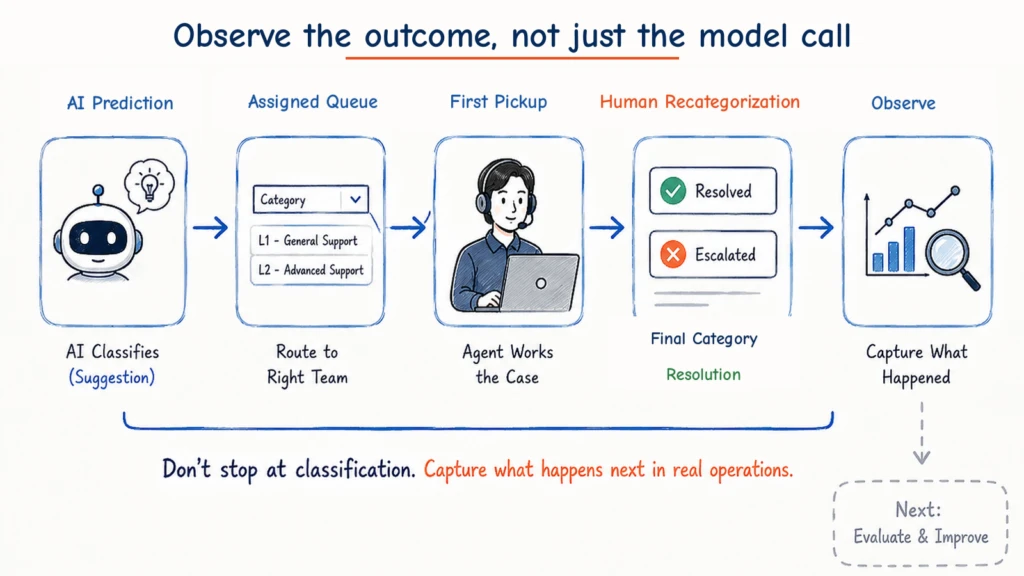
But there was one thing I wanted to add: visibility into how the AI’s first judgment is actually consumed by the business process.
I think of this less as expanding the implementation scope and more as expanding the observation scope.
At the time of the initial prediction, we can preserve at least:
- Case ID
- Predicted Level 1
- Predicted Level 2
- Confidence
- Model Version
- Prompt Version
- Prediction Timestamp
Then we can connect that prediction to operational data that Salesforce already produces:
- Assigned Queue
- First Pickup Time
- Whether the Category Changed
- Changed From / To
- Changed By
- Changed At
- Final Category
- Resolved At
Seen this way, the original automation starts to take on a different shape.
The prediction is not the end of the story. We connect it to what actually happened afterwards in the business process.
The point is not to monitor the LLM for its own sake.
The point is to make the business consequences of an AI judgment observable later.
7. You Cannot Know Whether the AI Was Right at Prediction Time
Suppose the AI returns this result:
Level 1 = Technical Support
Level 2 = Device Failure
Confidence = 0.94
At that moment, what we know for sure is that the model produced an answer and the system processed it successfully.
We still do not know whether that answer was right in the real operation.
We only learn that later: whether the Case went to the right Queue, whether the agent handled it without changing the Category, whether it was recategorized, and what final Category it eventually reached.
That is why I think AI observability in this kind of system is different from ordinary application monitoring.
Of course, production operations still need technical signals such as:
- HTTP Status
- Latency
- Token Usage
- Exception
- Model Response
But those signals alone do not tell us whether the AI feature is making good business decisions.
I also want to see:
- Predicted Category
- Assigned Queue
- First Pickup Time
- Human Recategorization
- Final Category
- Resolution
For example, the API may respond in 700 ms with zero errors, yet a large share of AI-classified Cases may still be recategorized by agents. It would be hard to call that feature successful.
The reverse can also be true. Some predictions may be imperfect, but if most Cases reach the right operating team quickly and the manual classification workload drops substantially, the feature may still be creating meaningful business value.
Observing whether the service is technically healthy and observing whether AI is making useful business judgments are two different problems.
A production AI feature should let us follow the model call all the way to the downstream business outcome.
8. A Human Correction Is Not Automatically Ground Truth
Once that operational data exists, another tempting shortcut appears.
Why not compare the AI’s first Category with the Category an agent chooses later and automatically treat the difference as labeled training data?
Sometimes that can be useful.
But it is dangerous to call it Ground Truth without context.
Suppose the first AI prediction was:
AI Prediction
Technical Support / Device Failure
Later, the agent changed it to:
Human Correction
Billing / Warranty Charge
The AI may simply have been wrong.
But there are other possibilities.
The original email itself may have been ambiguous.
The customer’s intent may have changed in a later email after the AI made its first prediction.
The agent may have changed the Category for operational convenience, for example to move the Case into a particular Queue rather than because the taxonomy definition demanded it.
Or the Level 1 / Level 2 definitions themselves may be ambiguous even to the people doing the work.
A Human Correction is an important signal, but it is not automatically Ground Truth.
So the question changes again.
Not “Was the AI wrong?” but “Why did the human change the AI’s judgment?”
That is the question that can lead to meaningful improvement.
9. A Small Automation Starts Creating Valuable Operational Data
The original customer requirement was clear: reduce the bottleneck created by one manager reading and categorizing every new Case.
But once the first AI prediction is connected with later workflow data, questions appear that were not part of the initial requirement.
Does misclassification happen disproportionately in a particular Category?
Do people and AI repeatedly confuse the same two Categories?
Is the Category usually correct, but First Pickup unusually slow in one Queue?
Do many Cases reach one team and then get reassigned to another?
Then an even more interesting question appears.
If AI keeps confusing A and B, and people also keep switching Cases between A and B, is this really only an AI problem?
The Category taxonomy itself may not reflect the work clearly enough.
The definitions may look distinct in documentation but overlap in the language customers actually use.
The classification may even be correct while the Assignment Rule or organizational responsibility behind the Category does not match the real operating process.
In other words, trying to introduce AI can expose ambiguity that was already present in the existing process.
That was the part I found most interesting.
What began as an attempt to automate one repetitive task can become a new observation point into how the workflow actually behaves.
A small automation can do more than remove a few clicks. It can start producing data that makes the existing process visible.
10. Small Implementation, Broad Thinking and Observability
The first implementation in this case can still remain simple.
Read the initial EmailMessage, classify Level 1 and Level 2, and keep using the existing Salesforce Assignment Rule.
I actually prefer starting that way.
Enterprise AX does not need to solve every edge case and every future workflow on day one.
Especially in real companies, systems and operating practices already exist.
Some screens are maintained by other teams. Some automation has been running for years. Some areas simply cannot be changed by the current project.
That is why an AX consultant needs more than AI knowledge.
You need to understand the service the AI is entering.
You need to see how people actually use it.
And you need to decide not only where new functionality belongs, but also where it should not be added.
Even if the implementation starts small, the way that AI judgment is consumed in the business process still needs to be observable.
This case reinforced one principle for me.
Implementation Scope can start small. Thinking Scope and Observability should not.
The customer’s original request was email Category automation, and that requirement has not changed.
But once I followed the operational consequences, it became clear that correct initial classification is not the end of the problem.
Real email conversations do not always stay inside the original Category.
A customer can introduce a completely different issue inside the same Email Thread. New messages can arrive before an agent picks up the Case. A conversation can move from one business intent to another while the technical thread continues.
That leads naturally to the next question.
When the customer’s business intent changes inside the same Email Thread, how far should AI be allowed to decide, and who should commit the actual Case state change?
The fastest design would let AI change the Case Category every time a new EmailMessage arrives.
That does not necessarily make it a good service workflow.
Someone may already be working the Case. The customer may return to the earlier issue a few minutes later. If every Category change also moves assignment and ownership, a highly responsive AI can destabilize the process it was supposed to improve.
So Part 2 starts by separating Email Thread identity from Business Intent. From there, it looks at AI proposing a Category transition, an agent accepting it, preserving the existing Case and handling history, and safely managing Resolution Time, team changes, and customer notification as the business state moves.
The principle stays the same:
High Model Confidence is not the same thing as authority to change Business State.
Once that operating structure exists, one more question remains.
Which Category changes were genuine AI misclassifications? Which edge cases keep recurring? How much should we trust human corrections? And when we change the Prompt, Taxonomy, or Rule, how do we prove that the new version is actually better than the old one?
That becomes the subject of Part 3.
In the end, this series is about three layers of the same problem:
- What should we delegate to AI?
- How should an AI judgment be applied safely to real business state?
- How should operational outcomes be used to improve that judgment over time?
It started as a small requirement to fill two Category fields from an email.
But in enterprise AX, even a small automation eventually connects to existing systems, human work, state transitions, and the learning loop that follows production.
That is where I think the real depth of AX consulting begins.