
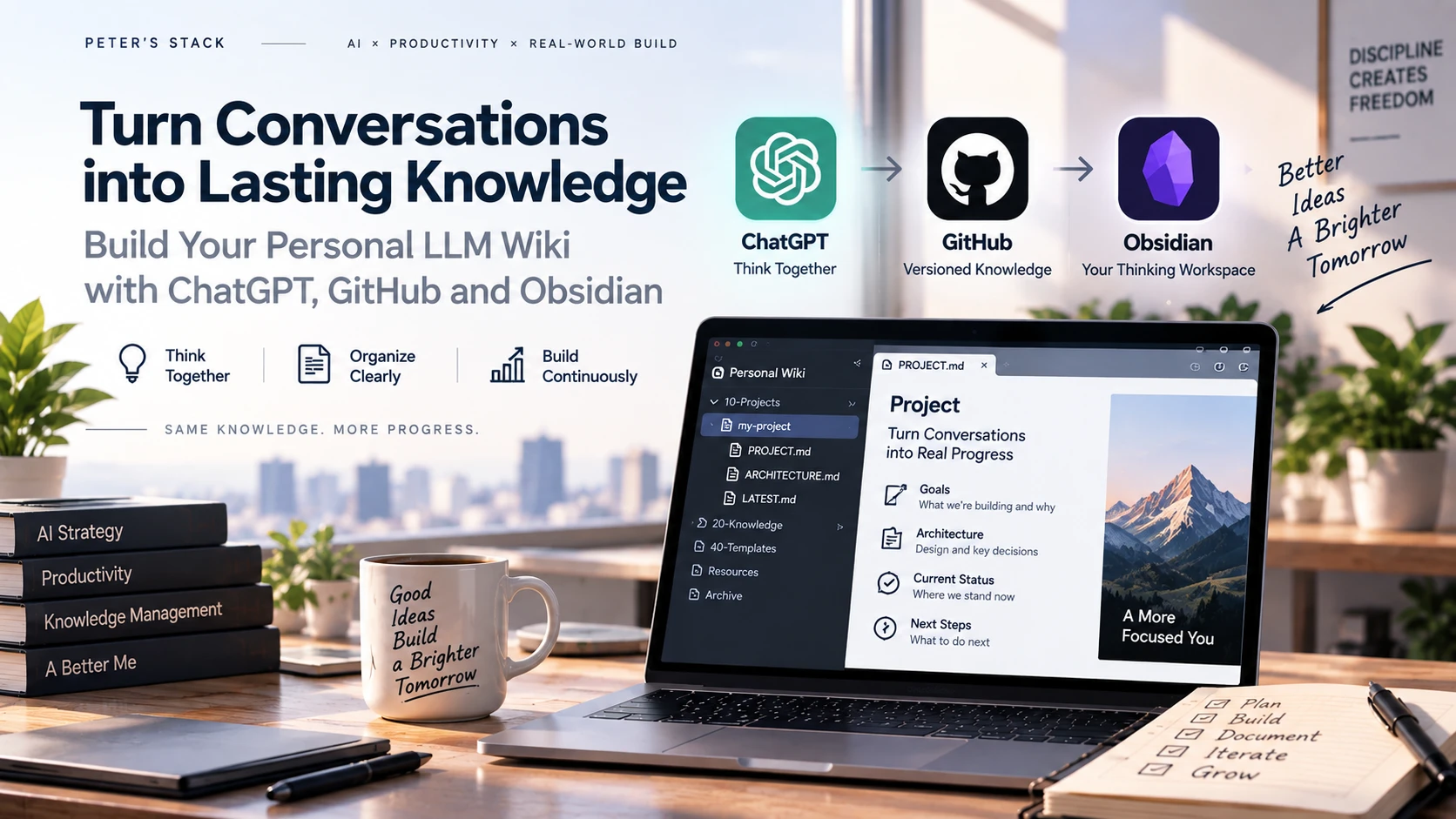
After running a project in ChatGPT for long enough, I eventually find myself asking the same question:
“Where did we leave off last time?”
For one or two conversations, that is not a serious problem. But once a project lasts for days or weeks, the situation changes. Architecture gets debated, assumptions get revised, old sessions become heavy, implementation options are compared, and earlier decisions are sometimes overturned.
ChatGPT has Memory. It also has Projects, and Project Instructions can hold useful operating rules.
But the longer my projects became, the more I realized that what I needed was not more memory.
I needed a clear representation of the current project state: which design is now authoritative, why it was chosen, which questions remain unresolved, and where the next session should resume.
So I reframed the problem.
Instead of asking ChatGPT to remember the conversation, what if I preserve the knowledge that survives the conversation as a project asset?
In this post, I will build the smallest version of the personal LLM Wiki that I actually use with ChatGPT, GitHub, and Obsidian.
The goal is not to build a massive knowledge-management platform.
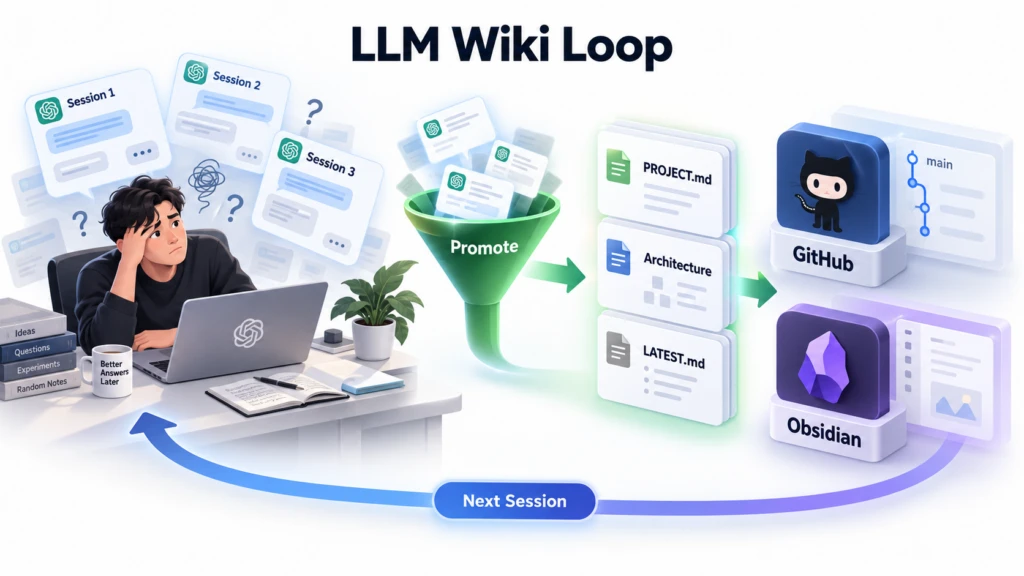
The goal is to create a small loop: brainstorm freely in ChatGPT, promote only settled knowledge into Markdown, let GitHub version that state, review it in Obsidian, and let the next ChatGPT session read the same state again.
Chat History and Project Knowledge Are Different Things
At first, I thought simply continuing the conversation inside one ChatGPT Project would be enough.
But real projects tend to evolve like this:
Session 1
→ Compare several ideas.

Session 2
→ Select one architecture.

Session 3
→ Review implementation details and revise the design.

Session 4
→ Discover a new constraint.

Session 5
→ “What is the current baseline architecture again?”
The problem is not that the earlier conversations are missing.
It is almost the opposite: there are too many earlier conversations.
Initial assumptions, abandoned designs, unverified ideas, and final decisions all coexist in the same history.
That led me to separate two concepts:
Chat History
= how we arrived here

Project Knowledge
= what we currently know and treat as the baseline
Memory is useful as well, but it serves a different purpose from a project’s Source of Truth.
Instead of merely hoping that ChatGPT roughly remembers an earlier discussion, I wanted the project to answer questions such as:
What is the current goal?

What is the current architecture?

What has been decided?

What is still a hypothesis?

What problems remain open?

What should happen next?
I decided to keep those answers in an explicit external document state rather than leaving them only inside ChatGPT’s internal context.
The Idea I Took from Karpathy’s LLM Wiki
While thinking through this approach, I found Andrej Karpathy’s idea of an LLM Wiki interesting.
A common document-based AI pattern looks roughly like this:
Documents
    ↓
Retrieve
    ↓
LLM
    ↓
Answer
Every time a question arrives, the system retrieves related information, reconstructs the context, and generates an answer again.
The interesting part of the LLM Wiki idea is different.
Instead of forcing the LLM to rediscover the same knowledge from raw material every time, the system interprets knowledge once and accumulates the result in a persistent Wiki that can keep evolving.
I did not try to reproduce the idea literally. I applied it to a problem I already had: continuity across long-running ChatGPT projects.
I adopted one principle:
Do not save the conversation. Save the knowledge that survives the conversation.
That does not mean moving every chat message into a Wiki.
During brainstorming, I promote only the information that the project will need to depend on going forward.
That distinction matters.
My Minimal Structure: ChatGPT + GitHub + Obsidian
The structure I wanted was intentionally simple.
ChatGPT
   ↓
Brainstorming
   ↓
Knowledge Promotion
   ↓
Markdown
   ↓
GitHub
   ↓
Obsidian
   ↓
Next ChatGPT Session
Each tool has a deliberately separate role.
ChatGPT thinks.
Markdown represents knowledge.
GitHub becomes the versioned Source of Truth.
Obsidian becomes the human-readable review workspace.
I am not using GitHub here simply as a backup destination.
I use it as a persistent Project State Layer shared between ChatGPT and me.
Because the state is managed with Git, I can see when a document changed, inspect the diff, roll back a bad change, and continue evolving the same files whether the change came from ChatGPT or from me.
Step 1. Turn an Obsidian Vault into a Git Repository
Start with a Vault that Obsidian can open.
If you already have one, you can use it as-is.
I roughly separate projects from general knowledge with a structure like this:
my-llm-wiki/
├─ 00-Inbox/
├─ 10-Projects/
├─ 20-Knowledge/
├─ 40-Templates/
└─ README.md
On Windows, a new Vault can start like this:
mkdir D:Obsidianmy-llm-wiki
cd D:Obsidianmy-llm-wiki

mkdir 00-Inbox
mkdir 10-Projects
mkdir 20-Knowledge
mkdir 40-Templates

git init
Open the folder in Obsidian using Open folder as vault.
Then create a GitHub repository and connect it:
git branch -M main
git remote add origin https://github.com/<YOUR_ACCOUNT>/<YOUR_REPOSITORY>.git

git add .
git commit -m "chore: initialize personal llm wiki"
git push -u origin main
There is no special AI technique in this step.
The important part is that ChatGPT and Obsidian will eventually operate on the same Markdown repository.
Step 2. Create the Minimum State Documents for Each Project
Now create one project under `10-Projects`.
There is no need to start with an elaborate Knowledge Taxonomy.
For a minimal setup, I think something like this is enough:
10-Projects/
└─ my-project/
   ├─ PROJECT.md
   ├─ architecture/
   ├─ decisions/
   └─ handoffs/
       └─ LATEST.md
These files serve different purposes.
`PROJECT.md` contains the relatively stable definition of the project.
For example:
# Project

## Purpose

The problem this project is trying to solve and its final objective.

## Current Scope

What is currently in scope and what is intentionally excluded.

## Core Principles

The main design principles agreed so far.

## Current Phase

The current phase of the project.

## Key Artifacts

The Architecture, Decision, and Handoff documents that define the current baseline.
`LATEST.md`, on the other hand, is the Working Context that lets the project resume.
# Rolling Handoff

## Current Goal

The objective currently being worked on.

## Current Direction

The design direction currently treated as the baseline.

## Decisions Made

The major decisions confirmed so far.

## Open Questions

Questions that remain unresolved.

## Known Risks

Known risks and constraints.

## Relevant Files

Documents that the next session should read.

## Next Actions

The work that should happen next.
The key is not to turn `LATEST.md` into a session diary.
If every session simply appends more text, the file eventually becomes another giant Chat History.
I use it as a Rolling Handoff that represents the current state.
Session 1
        ↓
LATEST.md v1

Session 2
        ↓
LATEST.md v2

Session 3
        ↓
LATEST.md v3
The past remains in Git History.
`LATEST.md` keeps only the information required to restart the work now.
Step 3. Connect ChatGPT to GitHub
Next, connect GitHub so ChatGPT can read and update the repository.
After connecting the GitHub integration, grant access to the repository you intend to use.
Rather than enabling access to every repository from the beginning, I prefer starting with something whose purpose is clear, such as a personal Wiki repository.
Once the connection is ready, I do not immediately ask ChatGPT to modify files. I first verify that it can read them.
For example:
Check my GitHub my-llm-wiki repository and read:

10-Projects/my-project/PROJECT.md
10-Projects/my-project/handoffs/LATEST.md

Summarize the current project state.

Do not modify any files yet.
The last sentence is important:
“Do not modify any files yet.”
Just because AI has repository access does not mean every conversation should automatically become a write operation.
I keep an intentional boundary between discussion and Knowledge Update.
Step 4. Think Freely During Brainstorming
Now I discuss the project with ChatGPT as usual.
Suppose I am exploring a new Enterprise AI Architecture.
I do not update the Wiki from the first turn.
Instead, I make the brainstorming boundary explicit:
We are in brainstorming mode.

Do not modify PROJECT.md or the architecture documents yet.

Compare possible structures freely, including alternatives and hypotheses
that have not been confirmed.
Inside the conversation, the direction can change as often as necessary.
Idea A
 ↓
Problem discovered
 ↓
Idea B
 ↓
Counterargument
 ↓
Idea C
 ↓
New hypothesis
Most of this is not final knowledge.
If I store all of it, the Wiki becomes polluted very quickly.
The boundary I try to maintain looks like this:
Conversation
├─ Exploration
├─ Hypothesis
├─ Rejected Idea
├─ Open Question
└─ Durable Knowledge
           ↓
        Promote
In other words, ChatGPT should think freely, while the Wiki should change conservatively.
Step 5. Promote Only Settled Knowledge
After several rounds of discussion, suppose the direction has become reasonably clear.
That is when I first ask for a repository update.
For example:
Update the project documents using only what has been confirmed so far.

Use these rules:

- Do not record hypotheses as confirmed facts.
- If something conflicts with an existing decision, do not overwrite it arbitrarily.
- Apply confirmed Architecture changes to the relevant documents.
- Keep unresolved issues under Open Questions.
- Keep PROJECT.md focused on stable project baselines.
- Update handoffs/LATEST.md so the project can resume from the current state.

After the update, summarize which files changed.
This transition is the main reason I use the structure.
Dozens of conversation turns
           ↓
       Synthesis
           ↓
      Promotion
           ↓
A few explicit Markdown artifacts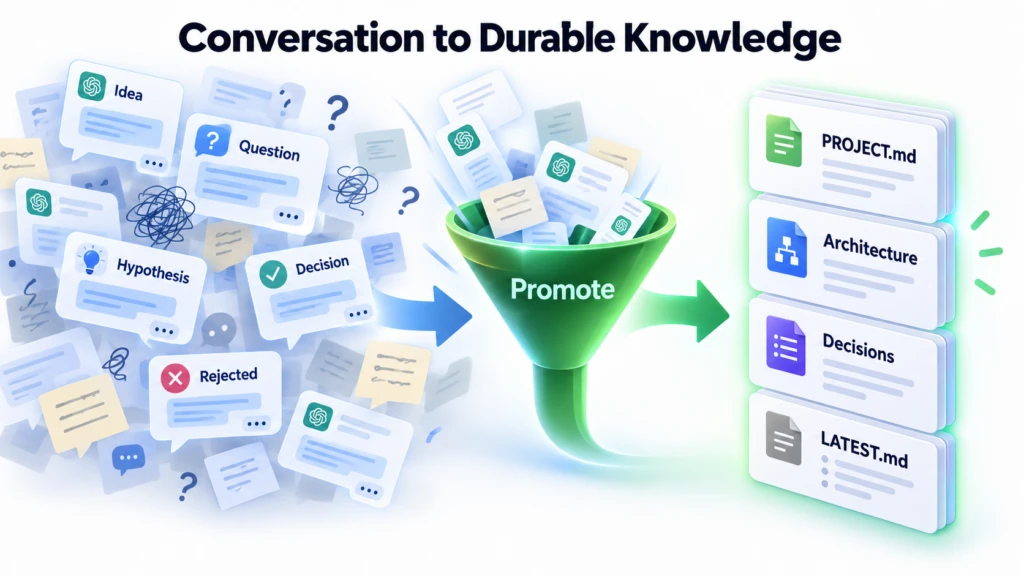
I think of this process as Knowledge Promotion.
The important question is not whether AI can summarize a conversation well.
The important question is whether the system can distinguish knowledge that future work should depend on from ideas that are still being debated.
GitHub Is Not Only for Storing Files
If I only needed Markdown, I could use Google Drive or a local folder.
But project knowledge has a time dimension.
An Architecture document might evolve like this:
v1
Agent performs every task

        ↓

v2
Separate Agent + Tool responsibilities

        ↓

v3
Separate Deterministic Tools + Agent Reasoning
If I only look at the current document, I may miss why the design reached v3.
Git preserves that evolution.
Current State
+
Diff
+
Commit History
+
Rollback
That is why GitHub becomes more than Cloud Storage. It becomes the Source of Truth for Versioned Project Knowledge.
Knowledge written by AI gains the same kind of change history as code and other project documents.
At that point, the personal Wiki starts to behave differently from a simple notes application.
Step 6. Use Obsidian as the Human Inspection Layer
When ChatGPT updates the repository, pull those changes into the Windows Vault.
cd D:Obsidianmy-llm-wiki
git pull --ff-only
If you use the Obsidian Git plugin, you can also use its Pull or Commit-and-sync functions.
Then read the changed documents directly in Obsidian.
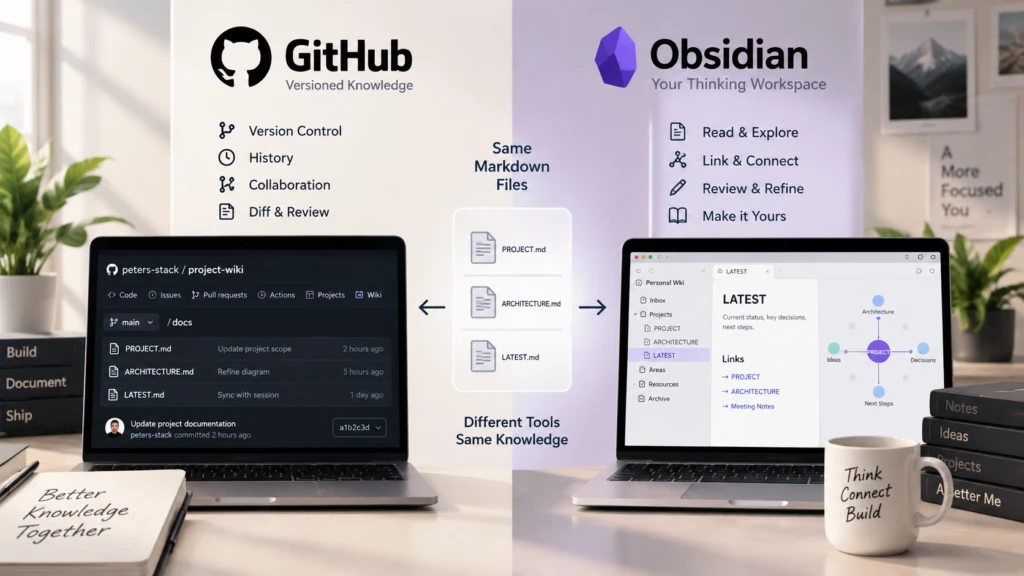
I do not need Obsidian to play a special AI role in this architecture.
I think of it primarily as the Human Inspection Layer.
I can read the project state that ChatGPT generated or modified, correct it when necessary, and avoid locking the knowledge into one specific LLM or SaaS because the source is plain Markdown.
LLM
→ Write / Maintain

Human
→ Read / Validate / Correct
This simple role separation matters more than it may seem.
If AI-generated knowledge exists only inside an invisible Memory layer, incorrect information can accumulate without being obvious.
A Markdown document is directly inspectable by a person.
Step 7. Restart the Project in a New ChatGPT Session
Now comes the most important test.
Instead of continuing the existing ChatGPT conversation, start a new session.
Do not explain the previous 20 turns again.
Ask ChatGPT to read the project state instead:
In my GitHub my-llm-wiki repository, read:

10-Projects/my-project/PROJECT.md
10-Projects/my-project/handoffs/LATEST.md

Summarize the current goal, confirmed design, unresolved questions,
and next actions, then continue from that state.
ChatGPT reconstructs the project’s current baseline from the external documents.
Previous Sessions
       ↓
   Compiled State
       ↓
PROJECT.md
LATEST.md
       ↓
 New Session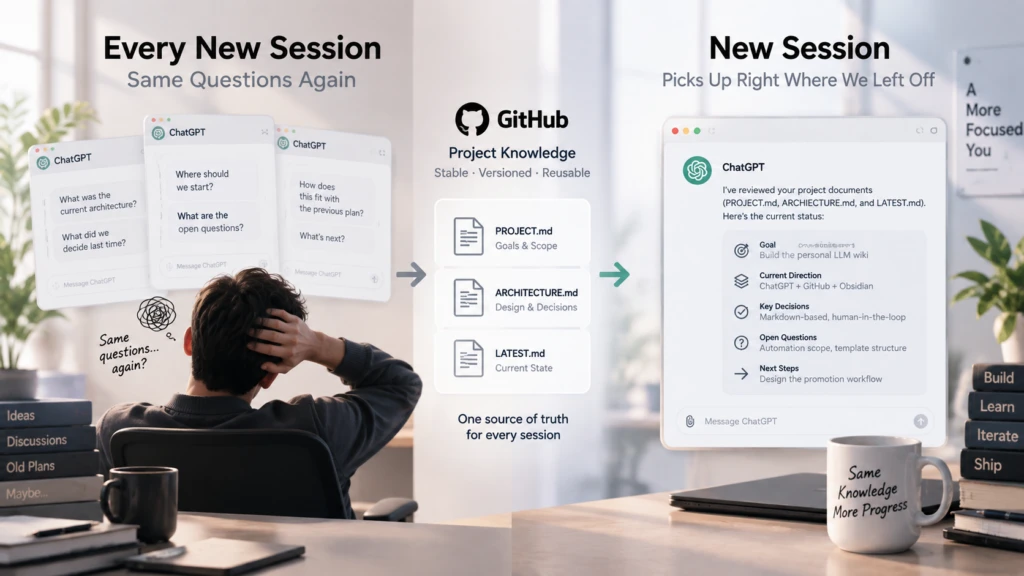
At this point, the session itself no longer owns the project state.
ChatGPT sessions can change at any time.
The project state remains in GitHub.
That difference has been significant in long-running work.
What Should Go into Project Instructions?
Before adopting this structure, I was tempted to keep adding more content to Project Instructions to preserve continuity across long projects.
Current Architecture, previous decisions, warnings, file locations, and active work status all start accumulating there.
Eventually, the Instructions can become something like this:
Project Instructions
=
Rules
+ Memory
+ Architecture
+ Current State
+ History
I prefer separating those concerns.
Project Instructions
= How to work

Project Wiki
= What we know
Instructions should contain relatively stable operating principles.
For example:
At the start of a new session, read PROJECT.md and LATEST.md first.

Do not infer previous decisions from conversation history alone.

Distinguish confirmed decisions from hypotheses.

Update Project Artifacts only when the user explicitly requests it.
Architecture and current progress are different. They keep changing, so I keep them in the Wiki.
This prevents Project Instructions from becoming an oversized prompt that tries to carry the entire project around with it.
What You Do Not Save Matters More Than Saving Everything
The phrase “LLM Wiki” can easily suggest a system that automatically saves every ChatGPT conversation.
But after using this approach, I found the opposite question more important:
What should not be saved?
Brainstorming needs wrong assumptions.
It needs extreme ideas, counterarguments, and discarded approaches before the design improves.
If all of those traces are stored as if they were current Knowledge, the Wiki becomes more confusing, not less.
My workflow is closer to this:
Think freely
     ↓
Challenge
     ↓
Decide
     ↓
Promote selectively
     ↓
Maintain current knowledge
This is not about building a Conversation Archive.
It is closer to compiling Project Knowledge.
A Personal LLM Wiki Is Also a Small Experiment in Enterprise Knowledge Architecture
So far, this may look like a personal productivity setup.
For an individual project, that alone is already useful.
But after building it, I noticed that the underlying problem resembles the questions I deal with in Enterprise AI.
At a personal scale:
Conversation
     ↓
Human Judgment
     ↓
Knowledge Promotion
     ↓
Markdown
     ↓
Reuse
At enterprise scale, the volume is larger, but the underlying questions are similar.
Documents / CRM / Meetings / External Data
                  ↓
              Interpretation
                  ↓
         Reconciliation / Validation
                  ↓
          Knowledge Promotion
                  ↓
        Enterprise Knowledge
                  ↓
             Agent Reuse
In a personal Wiki, I decide which information gets promoted.
In an enterprise environment, that same step introduces much harder questions.
Who is allowed to see the information? Which Source should be trusted more? What happens when new information conflicts with existing knowledge? When should stale knowledge expire? How far should AI be allowed to update it automatically?
In other words, once Governance starts expanding around a Personal LLM Wiki, the problem naturally becomes an Enterprise Knowledge Architecture problem.
This post does not go that far.
The purpose here is to validate the core principle at the smallest possible scale first.
My Conclusion: Design State Before Memory
The longer we use ChatGPT, the easier it is to assume that what we need is better Memory.
From a project perspective, I think the question should come earlier than that.
Before deciding what the AI should remember, decide what state the project itself should preserve explicitly.
The minimal loop I use today is simple:
Think in ChatGPT.

        ↓

Promote only confirmed knowledge into Markdown.

        ↓

Let GitHub preserve the state with version history.

        ↓

Review it in Obsidian.

        ↓

Let the next ChatGPT session read it again.
I did not need a special Vector DB, Graph DB, or separate Agent Platform to start.
Markdown and Git were enough to establish the habit of separating conversation from project knowledge.
I now see this simple structure as a useful starting point for designing a larger LLM Wiki later.
The goal is not to preserve conversations forever.
The goal is to preserve knowledge that can support the next decision.
In the next post, I plan to go one step further and connect the Project State written by ChatGPT in GitHub to actual automation.
If a Git Commit becomes more than a record—if n8n and a server can receive it and execute a workflow—GitHub can evolve from a Knowledge repository into a Control Plane between AI and the actual Runtime.