
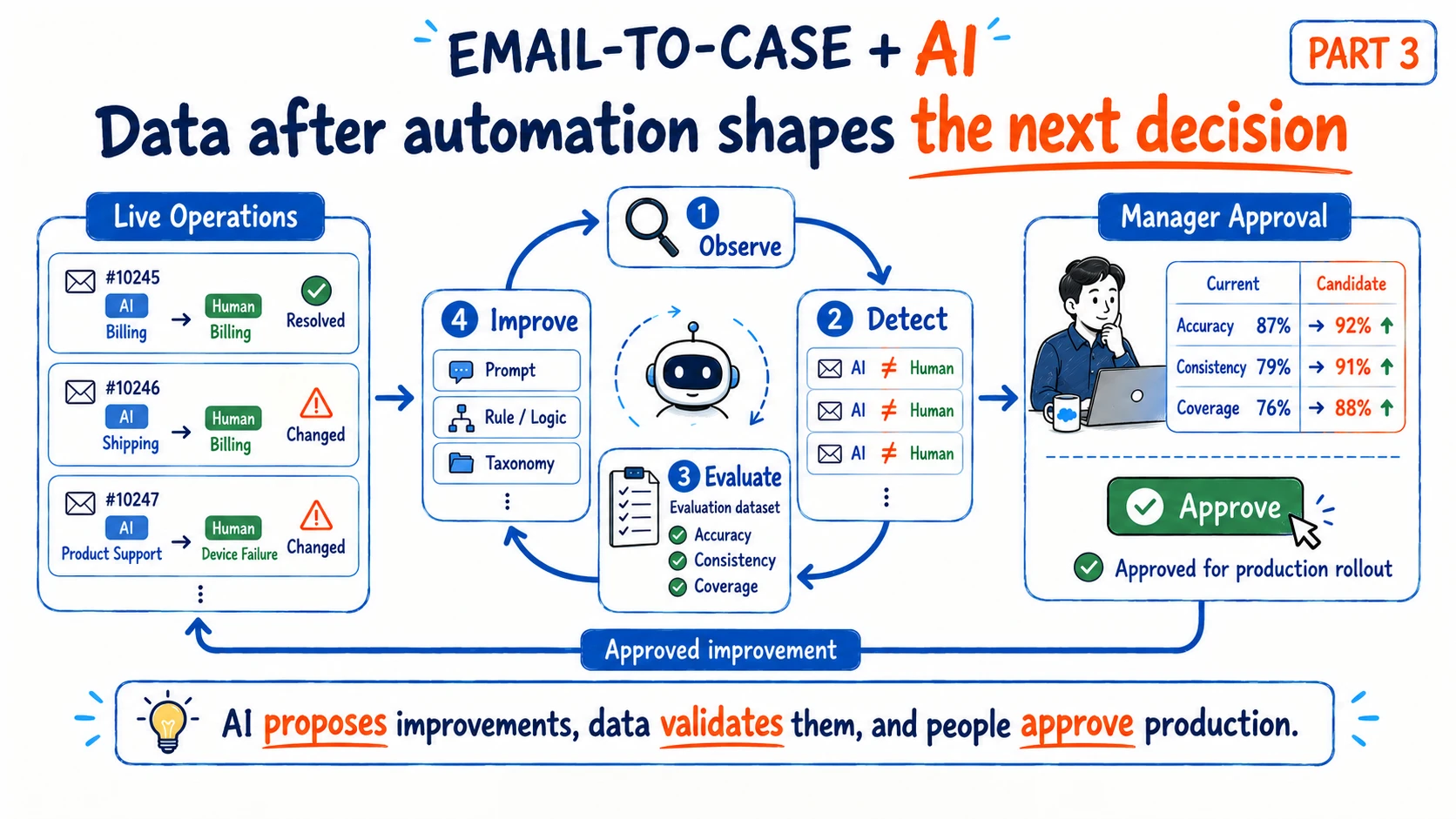
In the previous two posts, I kept following one small requirement as it expanded into a broader enterprise AI design problem.
In Part 1, the customer’s request was simple: when Salesforce Email-to-Case creates a Case, let AI determine the Level 1 and Level 2 Category instead of making one manager read every new inquiry manually.
In Part 2, the question changed. Even if AI can understand that the customer’s intent has changed, it does not follow that the model should immediately change the Case Category, owner, Queue, and operating history.
That led to a design where the LLM handles ambiguous language, while Human Accept and deterministic application logic control actual business-state changes.
At that point, the customer’s original pain point is largely solved.
The manager no longer needs to read every new Case just to select L1 and L2.
But imagine the project has been running for three months.
A different question appears.
Which inquiries has the AI repeatedly misclassified, and how much better is the classification logic now than it was when we first deployed it?
If the system cannot answer that question, something is missing.
We may have built an AI classification feature without building the capability to improve it from real operations.
This post is about what should happen after automation starts producing data.
It is not simply about storing more logs.
It is about which signals to preserve, what should count as a real misclassification, how production signals become an Evaluation Dataset, how improvement candidates should be tested, and how validated changes can return to Production without turning the system into an uncontrolled feedback loop.
1. Automation Can Be Complete Before the Improvement System Is
For a practical delivery project, this can already be a successful implementation:
Incoming Email
      ↓
Salesforce Case
      ↓
AI Classification
      ↓
L1 / L2
      ↓
Assignment Rule
      ↓
Right Team
The manual classification bottleneck is reduced.
The API works.
The Structured Output is valid.
The Case Category is updated.
The Assignment Rule executes.
If we look only at the contracted requirement, the work is done.
The harder questions arrive later.
A few months into operations, someone may ask:
“Which Categories does the AI confuse most often?”
“We changed the Prompt last month. Did it actually improve the result?”
“How many Cases were sent to the wrong Queue?”
“When a Case is recategorized, how much longer does resolution take?”
If the required data was never captured, those questions are difficult to answer after the fact.
In AX, useful data is not automatically created as a by-product of running the system. We need to think in advance about what we may want to understand later.
That is slightly different from Implementation Scope.
The customer may only have requested automated classification.
The delivery team may fully satisfy the contract by implementing exactly that.
But whether we also close off the system’s future Improvement Capability is a separate architecture decision.
2. Current State and Historical Events Are Different Data Problems
Suppose a Salesforce Case stores only its current Category.
The AI initially sets:
BillingLater, an agent changes it to:
Product SupportIf we query the Case now, we may only see:
Current Category = Product SupportBut the questions we may want to answer later are much richer.
What did the AI originally predict?
What was the model’s Confidence?
Which EmailMessage and Context did it use?
Which model and Prompt version produced the prediction?
Which Queue received the Case first?
When did an agent first pick it up?
When was the Category changed, and by whom?
Why was it changed?
Which Category was final?
How long did the actual Resolution take?
Saving the Current State and preserving the History are different problems.
This is why, in Part 2, I deliberately considered timestamps such as Category Started At, Transition Accepted At, First Pickup At, and Resolved At.
Even if nobody is building a Dashboard today, an event that may matter later needs to be recorded when that event happens.
3. Prediction Data Has to Be Connected to Business Outcomes
I do not think of AI Observability as simply keeping model-call logs.
A Prediction record might contain:
Case ID
EmailMessage ID

Predicted Category Key
Confidence
Predicted At

Model Version
Prompt Version
Taxonomy Version
Rule Version
The actual business workflow may then produce:
Assigned Queue
First Pickup At

Transition Proposed
Accept / Reject

Category Changed
Changed From / To
Changed At

Final Category
Resolved At
Escalated
Keeping both sets of data is useful, but keeping them separately is not enough.
The important part is connecting them as one operational chain:
Prediction
      ↓
Assignment
      ↓
Human Operation
      ↓
Correction / Transition
      ↓
Outcome
Then we can move beyond a statement like:
“AI classified the Case as Billing.”
We can say:
“AI classified the Case as Billing and it was assigned to the Billing Queue. An agent picked it up 12 minutes later. Eighteen minutes after that, the Category was changed to Product Support. The issue was then resolved 42 minutes later in Product Support.”
Only at that point can we discuss how the AI judgment affected the actual work.
4. A Human Category Change Does Not Automatically Mean the AI Was Wrong
The easiest way to detect a possible error seems obvious.
AI Prediction
Billing

Human Final Category
Product Support
Why not simply label that as:
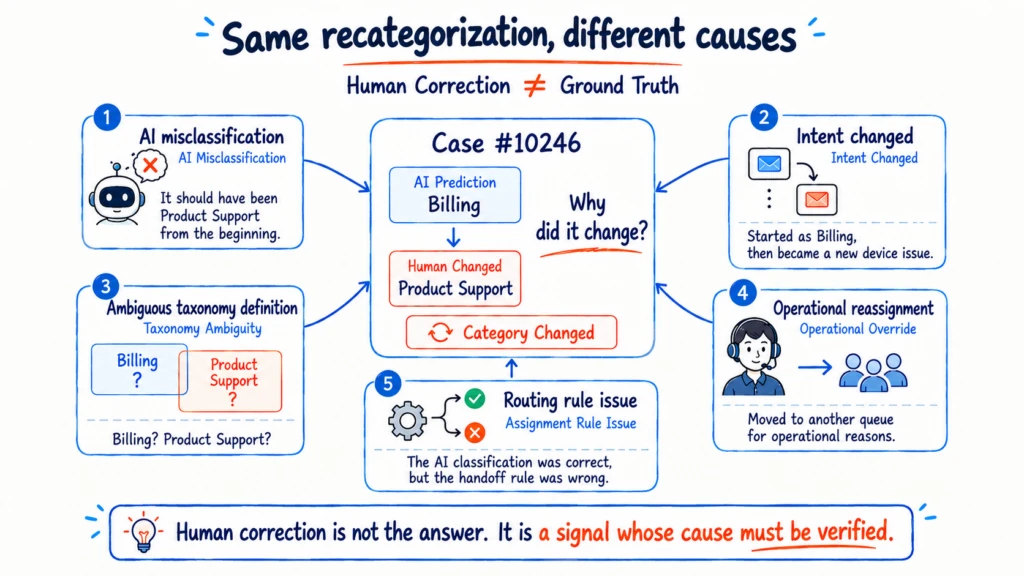
AI WrongBecause, as Part 2 showed, real email operations are messier than that.
The original email may genuinely have been a Billing inquiry, while the customer introduced a new device issue later.
The definitions of the two Categories may themselves be ambiguous.
An agent may move a Case to another Queue for operational convenience.
The AI Category may have been correct while the Assignment Rule was wrong.
The same Category Changed event can therefore have very different causes:
AI Misclassification
Intent Changed
Taxonomy Ambiguity
Operational Override
Assignment Rule Issue
Other
That leads to an important distinction.
Human Correction is not Ground Truth.
Human Correction is a very important signal.
But it should not automatically become the answer label.
The better question is not:
“Was the AI wrong?”
It is:
“Why did the human change the AI’s judgment?”
That question tells us what kind of improvement is actually needed.
5. Making Managers Review Every Correction Recreates the Work We Removed
If Human Correction is not automatically Ground Truth, another solution seems available: ask a manager to review every changed Case.
Suppose one month produces:
Total Cases
10,000

Human Recategorization
430
We could ask the manager to read all 430 cases and answer:
AI Wrong?
Yes / No
Technically, that creates reviewed labels.
Operationally, it creates an odd loop.
Originally, the manager manually classified every Case.
We introduced AI to remove that repetitive work.
Then we created hundreds of AI-review tasks and gave them back to the same manager.
There is little value in removing manual classification only to recreate it under the name of AI review.
Instead of looking at every Case first, I would start by looking for repeated patterns.
6. Review Patterns Before Reviewing Individual Cases
Suppose one change appears:
Technical Support
Device Failure
        ↓
Billing
Warranty Charge
Once may be noise.
But if the same transition appears 37 times in the last 30 days, it becomes a useful candidate for investigation:
Technical Support / Device Failure
→ Billing / Warranty Charge

37 Cases
Now there is evidence that the model may be repeatedly confusing a particular boundary.
Frequency alone is still not enough.
Consider two patterns.
Pattern A
General Inquiry
→ Product Inquiry

150 Cases

Average Pickup Delay
+3 min
Pattern B
General Inquiry
→ Critical Incident

14 Cases

Average Pickup Delay
+47 min
Pattern A is much larger by count.
Pattern B may matter more to the business.
So a Review Candidate can conceptually consider several dimensions together:
Frequency
×
Business Impact
×
Ambiguity / Confidence
The point is not to invent a sophisticated score on day one.
The principle is simpler:
Do not send every Case back to a human. Find the patterns that are most worth human attention.
7. The Manager’s Role Can Move from Classifier to Governor
The original operating model looked like this:
Every New Case
      ↓
Manager
      ↓
L1 / L2 Classification
With AI and operational data, the role can become:
Every New Case
      ↓
AI Classification
      ↓
Operation
      ↓
Pattern Detection
      ↓
High-value Edge Cases
      ↓
Manager Review
The manager no longer needs to classify every Case.
Instead, they can review patterns such as:
Pattern A
AI: Technical / Device Failure
Human: Billing / Warranty Charge
Cases: 37
Avg Delay: +18 min

Pattern B
AI: General Inquiry
Human: Critical Incident
Cases: 14
Avg Delay: +47 min
Then they inspect representative cases and determine the cause:
AI Misclassification
Taxonomy Ambiguity
Intent Changed
Operational Override
Rule Issue
The role moves from:
Classification Operator
to:
Classification Governor
I find this a more interesting way to think about how AX changes human work.
The goal is not simply to remove people from the loop.
It is to move people out of repetitive judgment and into the role of deciding which judgments should become trusted policy and which changes are safe to accept.
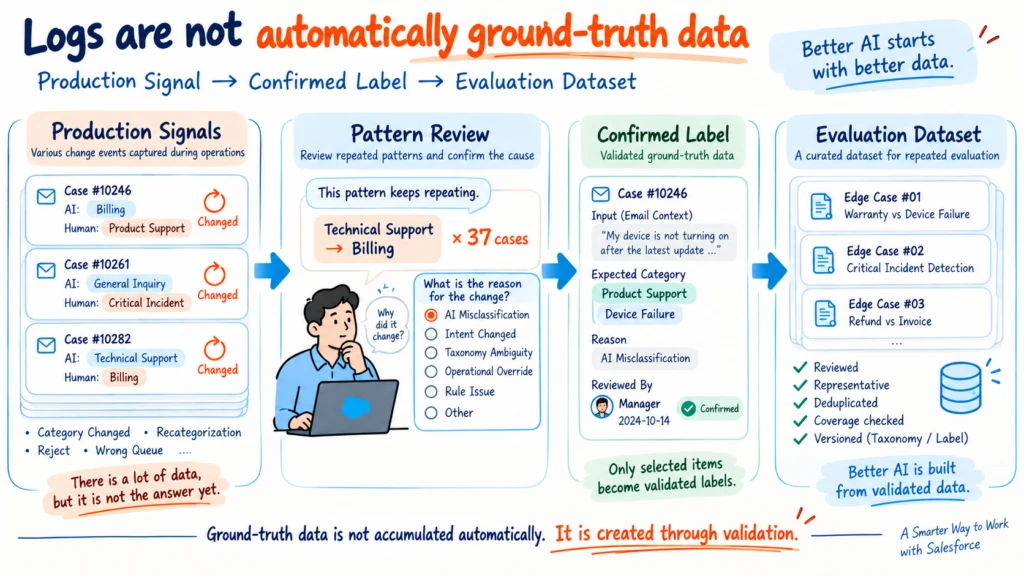
8. Production Logs Should Not Be Used as an Evaluation Dataset Directly
It also helps to distinguish several data layers that can look similar:
Production Log

Human Correction

Confirmed Label

Evaluation Dataset
Suppose the system records:
AI
Billing

Human later
Product Support
That is a useful Production Signal.
It is not yet the answer.
Now suppose a manager reviews the actual Case and Email Context and concludes:
Reason
AI Misclassification

Expected Category
Product Support / Device Failure
That is much closer to a Confirmed Label.
After enough confirmed samples are collected, we can prepare them for repeatable Evaluation by:
- reducing duplicates;
- checking Category coverage;
- preserving important Edge Cases;
- preventing highly similar examples from dominating one side of the dataset.
Only then do we have something closer to an Evaluation Dataset.
Production Log, Confirmed Label, and Evaluation Dataset are different things.
This distinction matters.
A loop like this can look attractive:
Production
→ Human changes label
→ Automatic learning
→ Back to Production
But if the human changed the Case for the wrong reason, or because the intent changed later, automatically feeding that change back as truth can amplify error instead of reducing it.
9. Ground Truth May Stop Being True When the Business Definition Changes
Even a curated Evaluation Dataset is not permanent.
The business taxonomy can change.
Suppose the current definition is:
Taxonomy v7

Billing
├ Refund
├ Invoice
└ Warranty Charge
A few months later, an organizational policy change moves Warranty Charge under Product Support.
A sample that was previously reviewed as:
Expected Category
Billing / Warranty Charge
may no longer be correct under the current taxonomy.
That means Evaluation Samples may also need context such as:
Taxonomy Version
Label Version
Reviewed At
Ground Truth is not necessarily timeless when the business definition itself changes.
Versioning in AI Evaluation is therefore more than a development convenience.
We need to be able to reproduce which definition of “Correct” was used when a result was evaluated.
10. A Misclassification Pattern Does Not Mean the Prompt Is the First Thing to Fix
When repeated misclassification appears, the most tempting response is often to edit the Prompt.
I also find that easy to think first:
“Maybe we can add one more sentence to the Prompt for this case.”
But the root cause may be somewhere else.
Taxonomy problem
The business definitions of two Categories overlap.
→ Fix the Category definitions first.
Prompt problem
The definitions are clear, but the instruction given to the model is insufficient.
→ Improve the Prompt.
Few-shot problem
The model lacks examples for a particular boundary condition.
→ Add or improve examples.
Input problem
Forwarded email text, signatures, and quoted history are creating noise.
→ Improve preprocessing or normalization.
Rule problem
A Salesforce Field or another deterministic condition already provides the answer.
→ Move that condition out of the LLM and into deterministic logic.
Context problem
The first Email alone does not contain enough information.
→ Adjust which Context is supplied.
Model problem
The current model cannot reliably distinguish the required meanings.
→ Evaluate another model.
Only after those options does Fine-tuning necessarily enter the discussion.
My rough order of consideration often looks like this:
Taxonomy
      ↓
Prompt
      ↓
Few-shot
      ↓
Input Normalization
      ↓
Deterministic Rules
      ↓
Context
      ↓
Model
      ↓
Fine-tuning
This is not an absolute sequence.
The principle is more important than the exact order:
Start with changes that are cheaper, more explainable, and easier to reverse whenever possible.
A stronger AI model is not automatically the right answer.
11. Runtime Classification and Offline Improvement Do Not Need the Same Model
Part 2 argued that the runtime classification itself may be simple enough for a relatively lightweight model.
For every inbound email, the job may be only:
L1 / L2 semantic classificationIf a smaller model meets the required quality, it can be a sensible choice for Production because latency and cost matter at runtime.
Improvement analysis has a different profile.
Suppose we collect one month of confirmed misclassification patterns and representative cases and ask:
Why are these Categories repeatedly confused?

Is the current Taxonomy ambiguous?

Which Prompt instruction is missing?

Can any condition move to a deterministic Rule?
That work happens less frequently, but it can require deeper reasoning.
For that stage, using a stronger reasoning model can be justified.
The architecture can separate the two roles:
Production Runtime
→ Lightweight Model
→ Fast, economical classification
and:
Offline Improvement
→ Stronger Reasoning Model
→ Pattern / Root Cause / Improvement Proposal
Instead of paying for the strongest model on every request, it can be more rational to match model capability to the kind of judgment being made.
This is another example of defining clear LLM boundaries instead of turning one large Agent into the owner of everything.
12. An Agent Can Propose Improvements Without Becoming the Validation Authority
This is where an Agent can become genuinely useful.
Suppose the manager has confirmed enough real misclassifications.
An Agent can orchestrate work such as:
Collect Confirmed Misclassifications
        ↓
Select Representative Cases by Pattern
        ↓
Analyze Root Cause
        ↓
Generate Prompt / Rule / Taxonomy Improvements
        ↓
Generate Candidate Logic
        ↓
Run Evaluation Dataset in Bulk
        ↓
Compare Current vs Candidate
        ↓
Write Improvement Proposal
That is a strong use case for an Agent.
It can call several tools, gather multiple data sources, run repeated evaluations, and summarize the evidence.
But there is still an important boundary.
The final claim that “the Candidate is better” does not need to depend only on an Agent’s natural-language judgment.
For the same Evaluation Dataset, the application can calculate the result deterministically.
For example:
Current Logic

Correct 910 / 1000
Accuracy 91.0%
Candidate Logic
Correct 943 / 1000
Accuracy 94.3%The application can also compute per-Category Regression.
The Agent can explain those results.
But numerical metrics and Release Gates can remain explicit code wherever possible.
The same principle returns again:
The Agent can explore and propose improvements. The validation criteria should remain as deterministic as practical.
13. Higher Overall Accuracy Does Not Automatically Mean a Better System
Suppose a Candidate Prompt produces:
Metric                  Current   Candidate
Overall Accuracy        91%       94%
Warranty Edge Cases     62%       91%
Critical Incident       96%       94%
Overall Accuracy clearly improves.
Warranty cases improve dramatically.
But Critical Incident accuracy drops.
If Critical Incident is operationally important, a 2% Regression may not be acceptable even when the global number rises.
Higher overall Accuracy does not automatically mean a better business system.
Evaluation therefore needs more than a single headline metric:
Overall Metric
+
Category Metric
+
Critical Edge Cases
+
Regression
And even those Model Metrics are not the final outcome.
14. Model Accuracy and Business Performance Need to Be Read Together
This is where the timestamps from Part 2 become important again.
Suppose classification Accuracy improves:
91%
→ 94%
That is good.
But suppose, in the same period:
Average Resolution Time
42 min
→ 55 min
It would be difficult to claim that the actual operation improved.
Operational data can therefore include measures such as:
Recategorization Rate

Wrong Queue Rate

Time to First Pickup

First Response Delay

Resolution Time

Category Transition Frequency

Category Oscillation

Escalation Rate
In a messy real-world process such as Email-to-Case, accurate event data becomes especially important.
A single Case can move across multiple business Categories inside one thread.
If we only look at the Current Category, earlier handling segments disappear.
If we calculate work duration from a historical record’s CreatedDate instead of the real business-start timestamp, the result can be distorted.
That is why the explicit handling segments and timestamps from Part 2 become the analytical foundation of Part 3.
Model Metrics and Business Metrics need to be connected.
Then we can move beyond:
“Classification became more accurate.”
and ask whether:
“The Case reached the right team faster, and the customer’s inquiry was actually resolved faster.”
15. Managers Should See Evidence, Not Just a Proposed Change
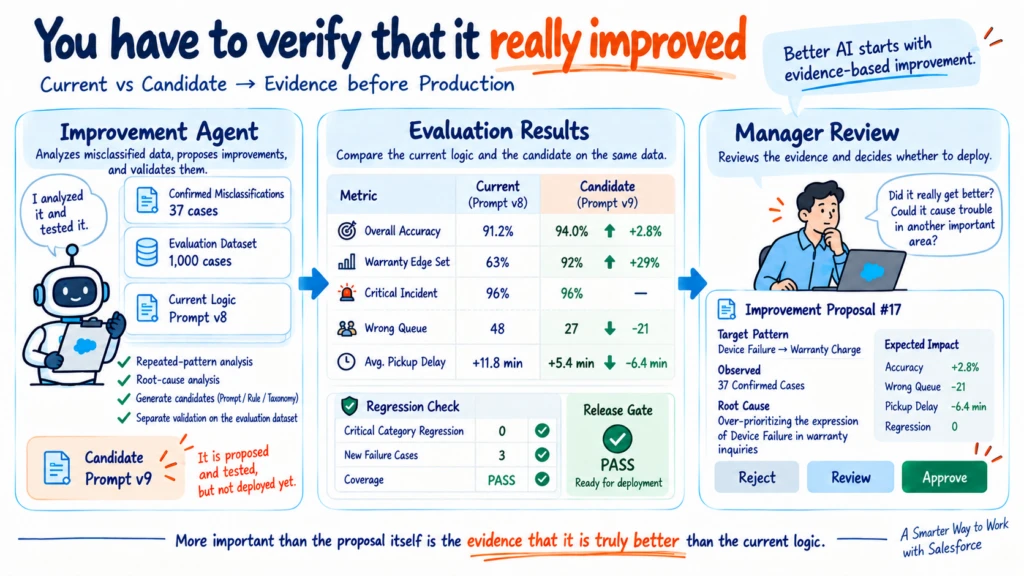
At this point, an Agent may be able to produce a proposal such as:
Candidate Improvement #17

Target Pattern
Technical / Device Failure
→ Billing / Warranty Charge

Observed
37 confirmed misclassifications

Root Cause
Warranty inquiries tend to over-weight
device failure wording

Proposal
Prompt v8 → v9

Evaluation

Overall
91.2% → 94.0%

Warranty Edge Set
63% → 92%

Critical Incident
96% → 96%

Business Simulation
Wrong Queue -21 cases / month
Estimated Pickup Delay -6.4 min
The manager should not merely see:
“AI recommends changing the Prompt.”
The useful review surface is the evidence:
Why the change is proposed, which data supports it, how much better the Candidate performs than the Current Logic, and whether any important Category regresses.
Then the manager can choose:
[Reject]
[Request Review]
[Approve]
An AI-generated improvement should not automatically become Production logic.
Manager Approval becomes another Production Boundary.
In Part 2, Human Accept controlled the state transition of an individual Case.
Here, Manager Approval controls a change to the AI logic itself.
The same governance principle applies at a different level.
16. This Is Where the Closed Loop Becomes Real
The full structure now looks like this:
Incoming Case
      ↓
AI Classification
      ↓
Assignment
      ↓
Human Operation
      ↓
Correction / Outcome
      ↓
Observability
      ↓
Pattern Detection
      ↓
Manager Review
      ↓
Confirmed Labels
      ↓
Evaluation Dataset
      ↓
Improvement Analysis
      ↓
Candidate Logic
      ↓
Bulk Evaluation
      ↓
Regression / Business Metrics
      ↓
Manager Approve
      ↓
Deploy
      ↓
Incoming Case...
At a glance, this looks like a Data Flywheel.
What matters to me is that the loop is not fully autonomous.
It is not:
AI observes
→ AI rewrites its own Prompt
→ AI deploys to Production
A more realistic structure is:
Observe
→ Detect
→ Propose
→ Evaluate
→ Review
→ Approve
→ Deploy
AI can do a great deal inside that loop.
It can find patterns.
It can analyze likely causes.
It can generate improvement candidates.
It can act as an Agent that executes thousands of Evaluation runs.
But there is no requirement to give AI ownership of the system state, the evaluation standard, and the authority to change Production at the same time.
17. The Hardest Decision Is Often Choosing This Structure Before Anyone Asks for It
The hardest part may not be drawing the Closed Loop diagram.
The practical challenge is that the customer often says:
“We only need automatic email Category classification.”
And from a delivery perspective, this can satisfy the requirement:
LLM Call
Structured Output
Salesforce Update
Assignment Rule
Why store Prediction History separately?
Why preserve Category Transition timestamps?
Why record Prompt Version?
Why think about an Evaluation Dataset now?
If the customer did not request any of that, expanding the project Scope may not be justified.
I do not think that concern is wrong.
Projects have schedules.
They have budgets.
They need boundaries.
But there is an important difference:
Keeping Implementation Scope small is not the same choice as eliminating the possibility of future improvement.
We do not need to build a large Evaluation Platform from the beginning.
But even preserving a minimal set of events can change what becomes possible later:
Prediction
Model / Prompt Version
Category Change
Accept / Reject
Pickup
Resolved
Both architectures can solve today’s customer pain point.
In one architecture, several months later we also have the data required to improve the system.
In the other, we may only have the final Current State of each Case.
18. AX Data Is an Asset We Have to Design, Not a By-Product We Receive for Free
When I first looked at this project, the customer’s problem appeared simple.
One manager was reading every new Case and selecting an L1/L2 Category.
It seemed enough to let AI make that decision.
But the scope of the thinking changed as I looked at the real Salesforce structure, the way customers use email, the way agents move through operational states, and what needs to be preserved when Categories change.
Eventually, the design came back to data.
What was the AI actually wrong about?
Why was it wrong?
Does the error repeat?
How much business impact does it create?
What change could fix it?
Did the change really make the system better?
To answer those questions, we need to think about data when AI is introduced, not after the AI feature has already been running for months.
In AX, data does not become valuable simply because the system has been running. We need to decide in advance which Signals and Outcomes must be preserved so that tomorrow’s improvement can be evaluated from today’s operations.
In Part 1, I argued that Implementation Scope can stay small while Thinking Scope and Observability should not.
After following the same problem through three posts, that principle is clearer to me.
Implementation Scope can stay small. Improvement Scope does not need to be closed.
Solving the customer’s current pain point matters.
A well-designed AX system can go one step further: today’s operation leaves behind the evidence required to make tomorrow’s judgment better.
That is the part of this small Email-to-Case classification case that I ultimately found most important.